


How to Install and Play CoinPoker on iOS (iPhone & iPad)
CoinPoker provides full access to our platform on iPhone and iPad through your mobile browser, with no downloads. We also have an app, but if you’d prefer to play in your browser, we’ve got you covered.
This quick guide gets you started with the CoinPoker web app for instant play on iOS mobile devices.
Step-by-Step: How to Play Poker in iOS Browsers
Accessing the CoinPoker web app for iOS is fast, with very little info needed to register.
Use Safari, Chrome, or Firefox on your iPhone or iPad, and follow the step-by-step process below to start playing on the iOS browser poker app.
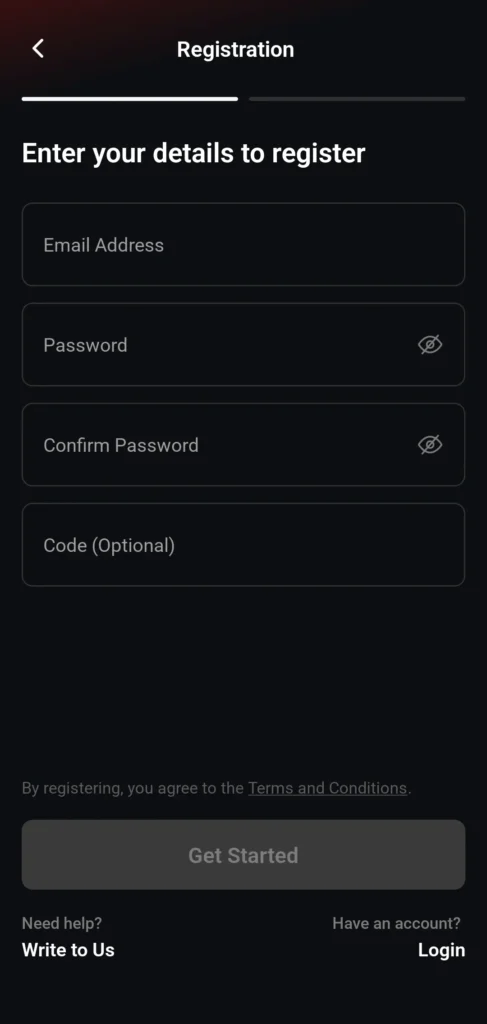
1: Register on iPhone or iPad
Visit Play.CoinPoker.com.
If that doesn’t work for you, click on the Register Here button below, and create your account.
You’ll just need a working email address and a password.
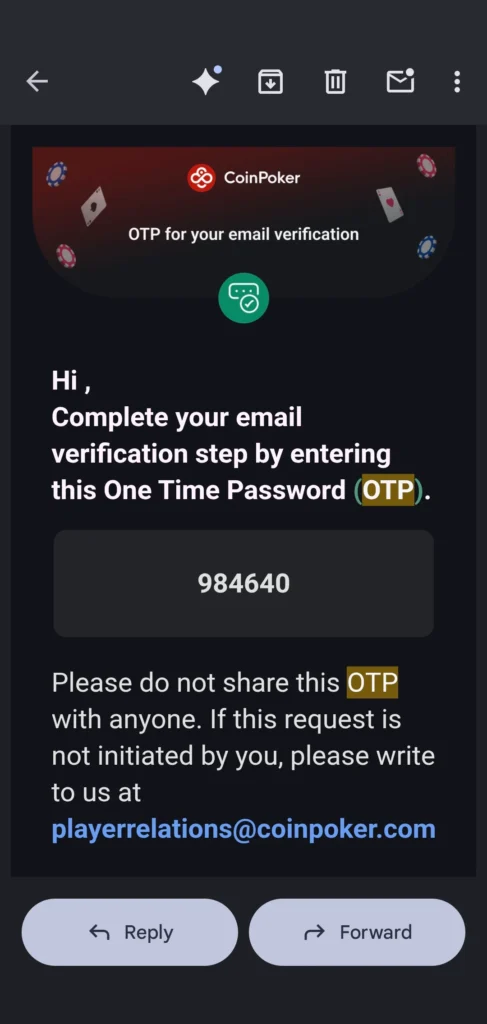
2: Confirm Your Email Address
When you log in for the first time, we’ll send you a confirmation email.
Check your email inbox and open the message from “[email protected]” or “[email protected].”
Collect the OTP code, then return to the CoinPoker web portal, and enter your OTP code.

3: Log In From Your iOS Browser
Return to the iOS web app (Play.CoinPoker.com) and sign in to your brand new account.
From here, you can access our online poker games, casino, sports betting, and more. You can also edit and view your account information, or use the Cashier.
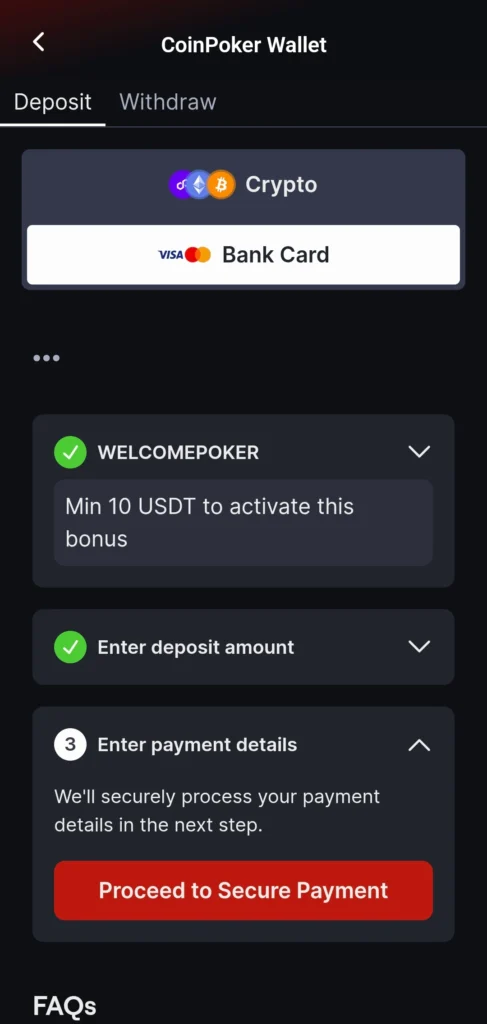
4: Make a Deposit or Play for Free
Tap the wallet icon for the Cashier, and then select Deposit.
Choose from the supported cryptos or deposit with a bank card, Luxon Pay, or Local Methods tuned to your region.
To play without a deposit on iOS, select Tournaments and Free/Centrolls from the menu.
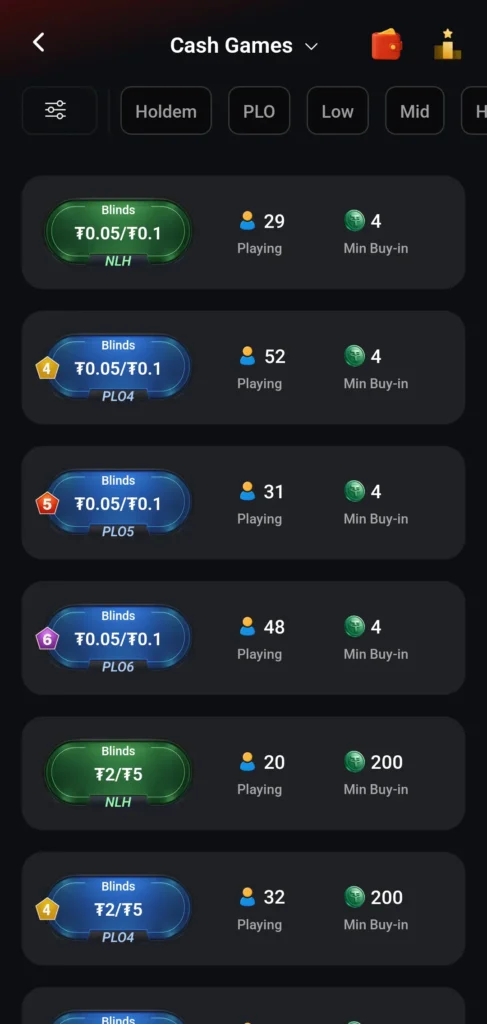
5: Browse & Choose Poker Games
Browse our wide range of iOS app poker games, including Texas Hold’em, Pot Limit Omaha, and 5-Card Pot Limit Omaha, and even 6-Card Pot Limit Omaha.
Choose stakes from $0.01/$0.02 to $2,500/$5,000 in our 24/7 cash games, or compete for huge tournament prize pools.
We also have free poker games, like freeroll poker tournaments or Practice Games.

6: Take Your Seat at the Tables
Tap Cash Games or Tournaments and choose a table or event.
Controls are optimized for touch, and the layout is designed for iPhone and iPad screens.
Play comfortably and conveniently on the CoinPoker iOS web app.
How to Save CoinPoker to Your iOS Home Screen
On iOS devices like iPhones or iPads, it’s simple to save CoinPoker to your home screen for quick access later.
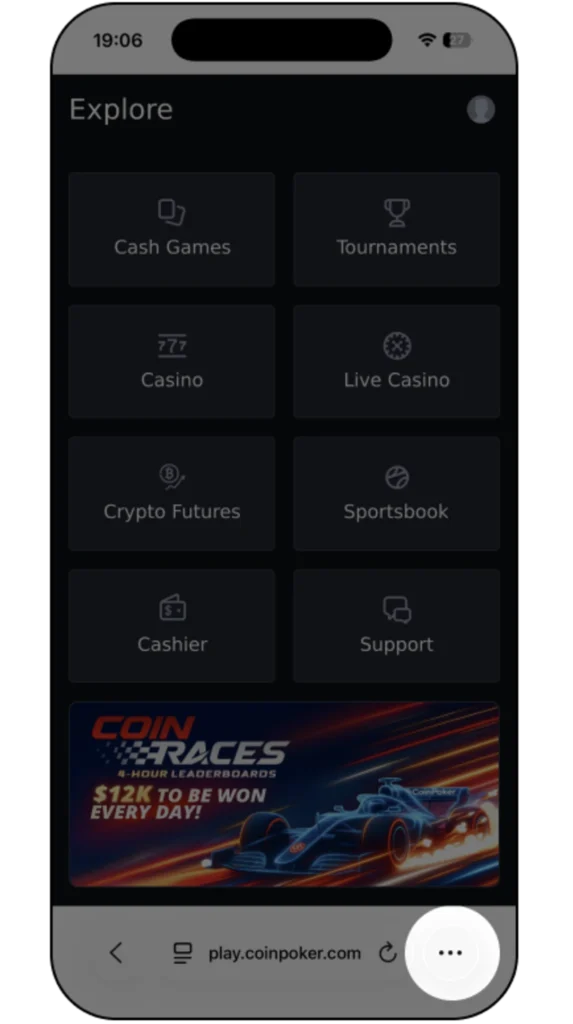
1. Launch your Safari browser and go to Play.CoinPoker.com. Click the three dots in the bottom right corner.
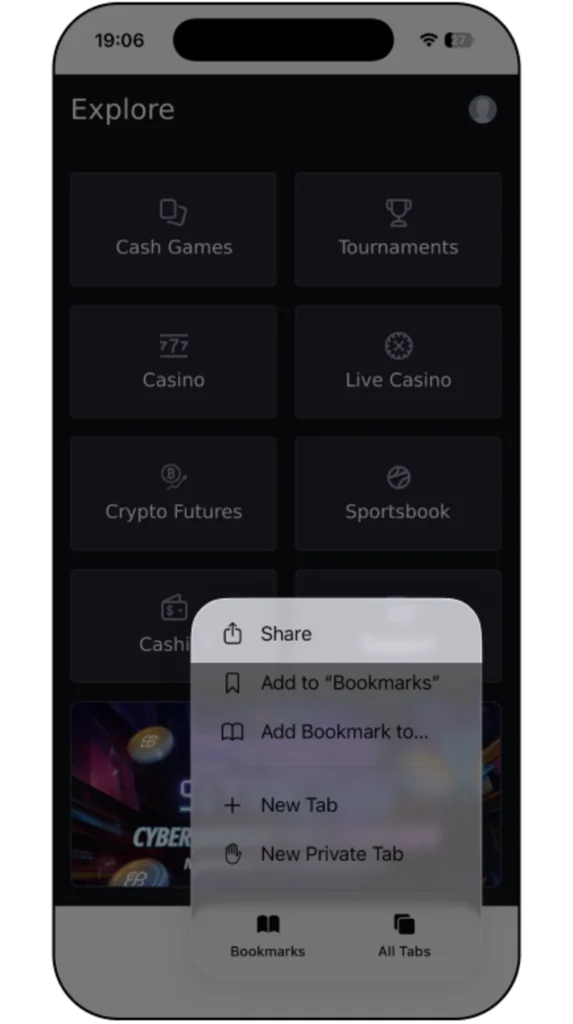
2. Tap the Share icon at the bottom of Safari to open the action menu on your device
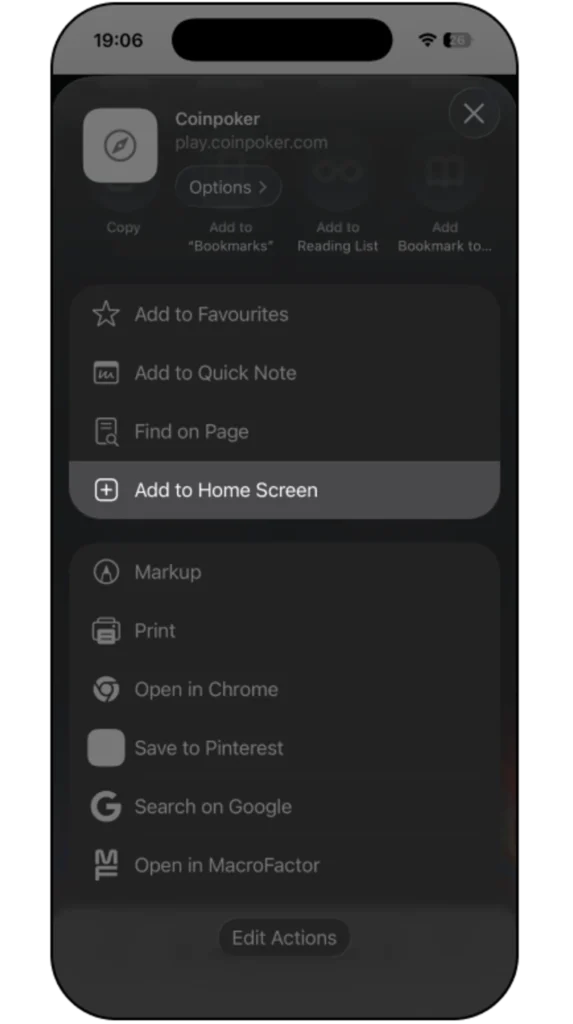
3. Select Add to Home Screen. The CoinPoker icon will now appear on your home screen for one-tap access.
What Bonuses Do New iOS Players Get on CoinPoker?
New players on the CoinPoker iOS browser app can claim several generous bonuses. Let’s cover each one so you can get rewarded as you play on iPhone or iPad.
150% Welcome Bonus Up to $2,000
Claim a 150% Welcome Bonus automatically as you make a first deposit of at least $10. The bonus is released instantly every time you generate table fees, up to a maximum of $2,000.
Simply unlock bonus rewards while playing real money cash games.
CoinRewards
Play using the CoinPoker iOS app in your browser to get CoinRewards.
Win from 2-hour CoinRaces, Splash Pots, Bankroll Boosts, and reward-unlocking Missions for cash game and tournaments.
The 3-Bet Club
Poker rewards get a massive upgrade for every 3-Bet Club member.
Get a consistent Base Reward for all games, active Power Ups to increase them, use Action Multipliers to go even further, and get deals on tournament buy-ins every month.
CoinPoker iOS App vs. Browser: Which Should You Use?
There are two ways to access CoinPoker from an iPhone or iPad: download the CoinPoker iOS app or play directly through a compatible mobile browser.
The iOS app provides a dedicated CoinPoker experience on your device, while browser play requires no download or installation. If you prefer browser access, open CoinPoker using Safari, Chrome, or Firefox and log in with your existing account.
Both options give you access to CoinPoker on compatible iPhone and iPad devices, so you can choose the method that best suits your device and preferences.
iOS Browser Poker FAQs
Get answers to common iOS questions here.
No. Installing the app is optional. You can either download the CoinPoker iOS app or access CoinPoker directly through a compatible browser on your iPhone or iPad.
Yes, it runs directly in your iPhone or iPad browser with no downloads.
You can choose to play in our web app, or download our iOS application.
Yes. CoinPoker supports compatible iPhone devices, with iOS 15 or later recommended for the downloadable app. Browser compatibility can depend on your iOS version, browser version, and device.
Yes, the layout adjusts to iPad screens for comfortable play.
Safari, Chrome, and Firefox all work well for the CoinPoker iOS web app.
CoinPoker recommends iOS 15 or later for its iPhone and iPad app. Your device should have at least 2 GB of RAM and 500 MB of available storage.
For the best experience, CoinPoker recommends 3 GB or more of RAM and at least 2 GB of free storage. If you don’t want to install the app, you can also access CoinPoker through a compatible mobile browser.